Auto-Generated API Documentation: How It Works, Why It Matters, and Where It Falls Short

Most developers have interacted with API documentation through tools like Swagger UI, Scalar, or Redoc. These platforms make exploring APIs remarkably intuitive—you can browse endpoints, inspect request and response schemas, authenticate, and even execute API calls directly from the browser.
Because these experiences feel so complete, a common misconception has emerged:
Auto-generated API documentation tools create API documentation.
They don't.
What they actually do is transform an OpenAPI Specification into an interactive developer experience.
Understanding this distinction changes the way we think about API documentation, developer experience, and the role these tools play in modern software development.
In this article, we'll explore:
Why API documentation exists
How auto-generated API documentation works
Why OpenAPI became the industry standard
What documentation engines actually do
What automation still cannot replace
By the end, you'll understand why generating documentation is only the beginning of building a great developer portal.
Why API Documentation Exists
An API enables one application to communicate with another. While the backend knows exactly how every endpoint behaves, developers integrating with that API do not.
Without documentation, developers are forced to answer questions through trial and error:
Which endpoint should I call?
Which HTTP method should I use?
What parameters are required?
What should the request body look like?
What response can I expect?
How is authentication handled?
What happens when something goes wrong?
Good API documentation answers these questions before developers have to ask them.
It shortens on-boarding time, reduces integration errors, and allows developers to build with confidence instead of guesswork.
How API Documentation Was Managed Before OpenAPI
Before standards like the OpenAPI Specification (OAS) became widely adopted, API documentation was usually maintained manually.
Teams commonly relied on:
Microsoft Word documents
PDF manuals
Internal Wikis
HTML pages
Knowledge bases
Although these approaches worked initially, they introduced a significant problem.
Whenever an API changed, the documentation also had to be updated manually.
In practice, this rarely happened consistently.
Over time, documentation drifted away from the actual implementation. Developers would discover endpoints that behaved differently from what the documentation described, making the documentation itself difficult to trust.
Maintaining documentation gradually became a separate project instead of a natural part of software development.
The Shift Towards Auto-Generated API Documentation
To solve this problem, the software industry adopted machine-readable API specifications.
Instead of writing documentation only for humans, developers also began describing APIs in a structured format that software tools could understand.
Today, the most widely adopted standard is the OpenAPI Specification (OAS).
Rather than manually writing documentation pages, developers define their APIs in a structured specification that includes:
Endpoints
HTTP methods
Parameters
Request bodies
Response schemas
Authentication requirements
Status codes
Examples
Descriptions
This specification becomes the Single Source of Truth.
Everything else—including interactive documentation—can now be generated from it.
📌 Figure 1 — How Auto-Generated API Documentation Works
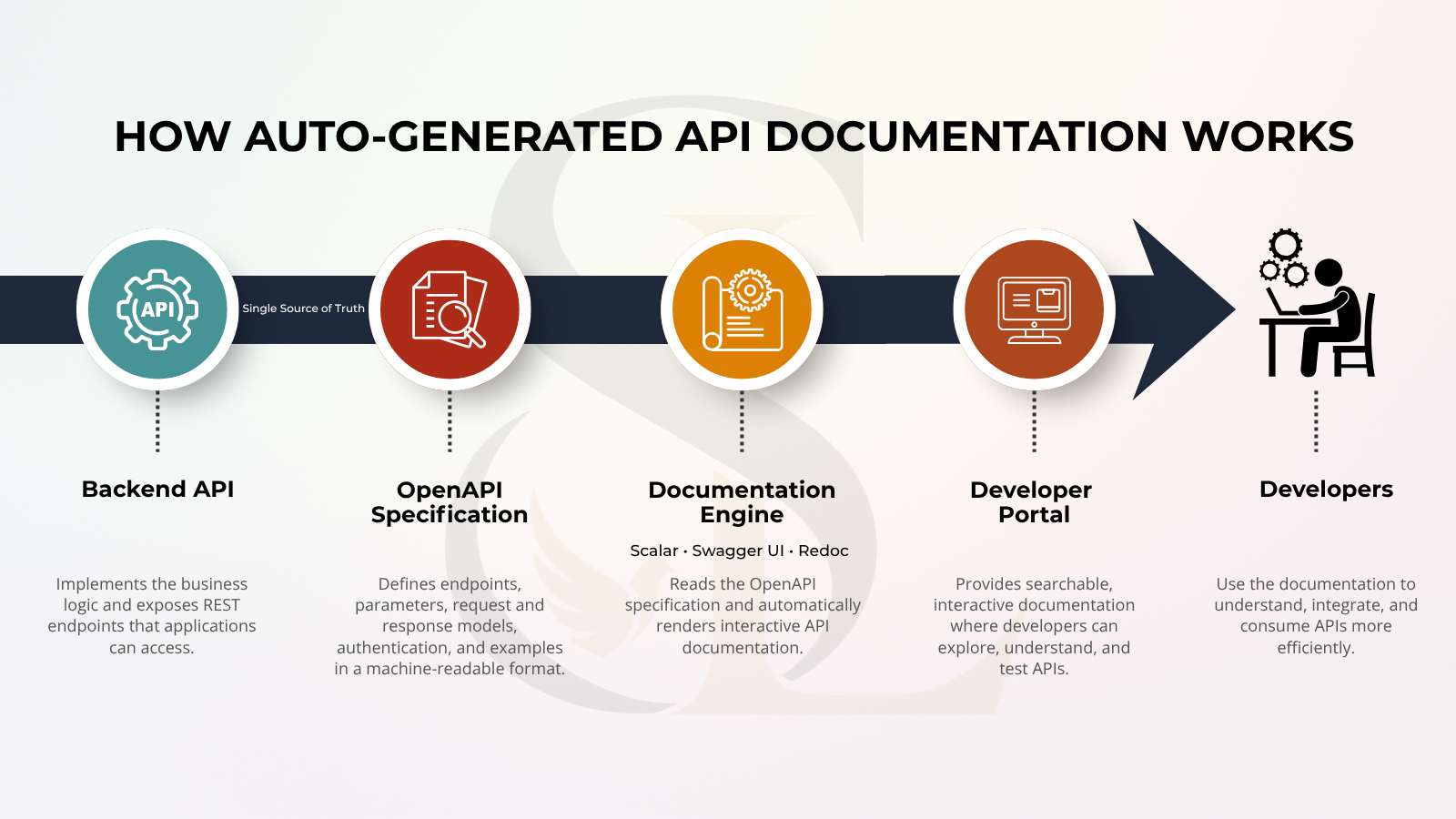
How Auto-Generated API Documentation Works
Although modern documentation portals appear sophisticated, the underlying workflow is surprisingly straightforward.
Backend API
      │
      ▼
OpenAPI Specification
      │
      ▼
Documentation Engine
(Scalar • Swagger UI • Redoc)
      │
      ▼
Interactive Developer Portal
Let's examine each stage.
1. Backend API
This is the actual application exposing REST endpoints.
For example:
GET    /students
POST   /students
PUT    /students/{id}
DELETE /students/{id}
These endpoints may be implemented using technologies such as ASP.NET Core, Spring Boot, Express.js, Laravel, or many others.
The backend contains the application's business logic—but it isn't documentation.
2. OpenAPI Specification
This is where the real documentation lives.
An OpenAPI Specification describes every aspect of an API in a structured, machine-readable format.
For every endpoint, it can define:
Summary
Description
Parameters
Request model
Response model
Authentication requirements
Error responses
Examples
Modern frameworks often generate this specification automatically from code annotations or attributes, ensuring that documentation evolves alongside the API itself.
3. Documentation Engine
This is where tools like Scalar, Swagger UI, and Redoc come into play.
They do not create documentation.
Instead, they read the OpenAPI Specification and transform it into a polished, interactive interface that developers can browse and search.
Because these tools rely on the specification, updating the OpenAPI document immediately updates the documentation.
4. Interactive Developer Portal
This is the final experience developers interact with.
Instead of static PDFs or outdated manuals, they can:
Search endpoints
Explore request and response schemas
Inspect examples
Authenticate
Execute API calls
Test responses directly from the browser
This is what makes modern API documentation both practical and developer-friendly.
Why Auto-Generated API Documentation Became the Industry Standard
Modern software evolves continuously.
New endpoints are introduced.
Existing APIs change.
Response models expand.
Authentication mechanisms evolve.
Version after version, maintaining documentation manually becomes increasingly difficult.
Auto-generated documentation solves this challenge by making the OpenAPI Specification the single source of truth.
Instead of maintaining multiple documents, teams update one specification that powers every documentation experience.
This approach offers several important advantages.
Always Synchronized
The documentation stays aligned with the API implementation because both are driven from the same specification.
Reduced Maintenance
Instead of updating Word documents, PDFs, or Wikis, developers maintain a single specification.
Faster Developer On-boarding
New developers can understand available endpoints and data models much faster.
Interactive Exploration
Developers can browse endpoints, inspect schemas, authenticate, and often execute requests directly from the documentation.
Consistent Presentation
Every endpoint follows the same structure, making large APIs significantly easier to navigate.
These advantages explain why auto-generated documentation has become the preferred approach across modern software teams.
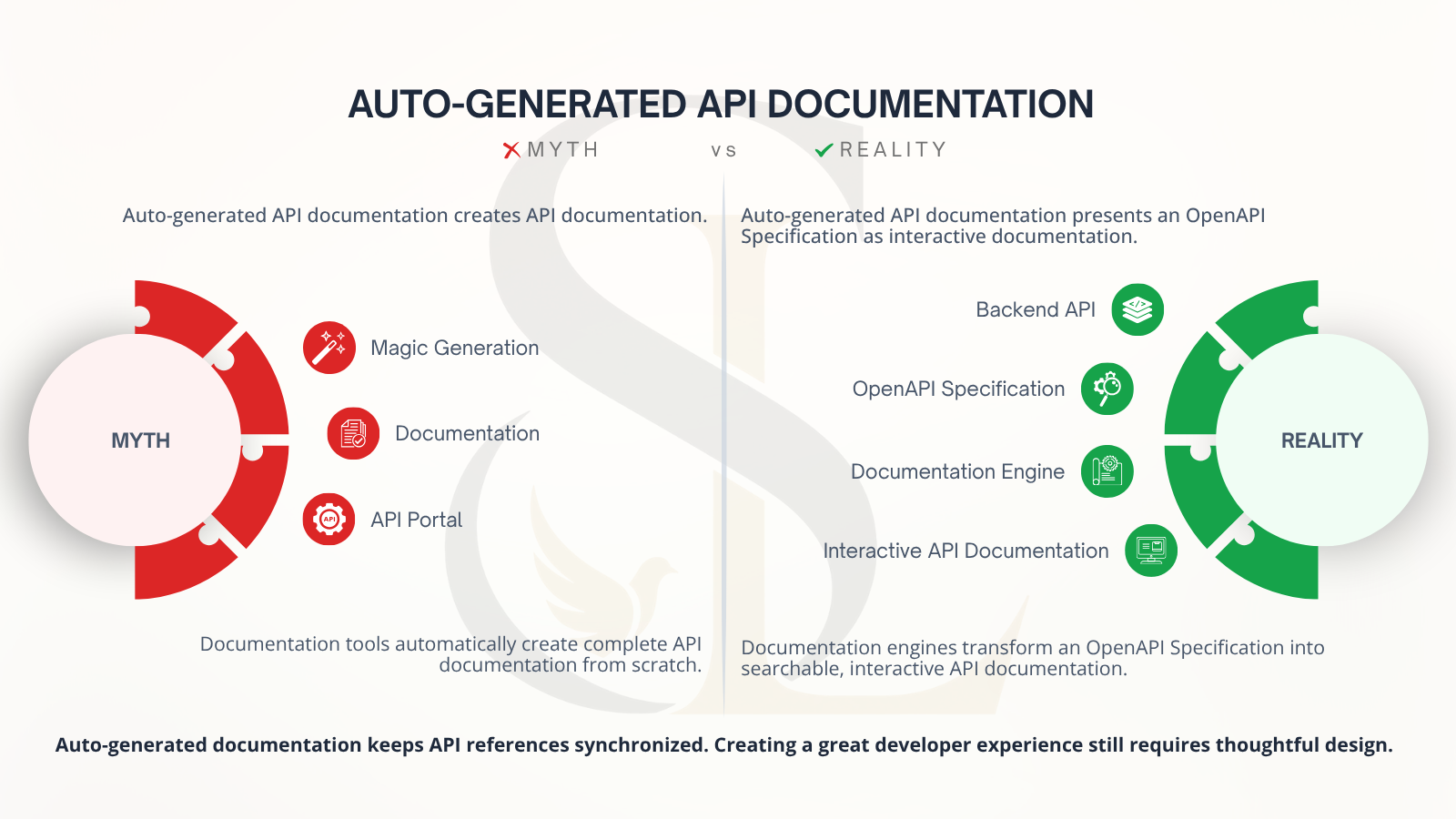
📌 Figure 2 — Auto-Generated API Documentation: Myth vs Reality
The Biggest Misconception
This is where many teams unintentionally stop.
They generate the documentation and assume the work is complete.
It isn't.
Auto-generated documentation solves one important problem:
Keeping API documentation synchronized with the implementation.
It does not automatically create an excellent developer experience.
Those are two completely different challenges.
Many developers assume tools like Scalar or Swagger UI somehow "understand" their APIs and generate documentation automatically.
In reality, those tools simply present information that already exists inside the OpenAPI Specification.
The documentation was never created by the documentation engine.
It was already there.
The documentation engine simply transformed it into something developers could easily explore.
Understanding this distinction changes how teams approach API documentation.
Instead of asking,
"Which documentation tool should we use?"
the better question becomes,
"How good is our OpenAPI Specification?"
Because the quality of the documentation can never exceed the quality of the specification it renders.
📌 Figure 3 — Automation Doesn't Replace Developer Experience
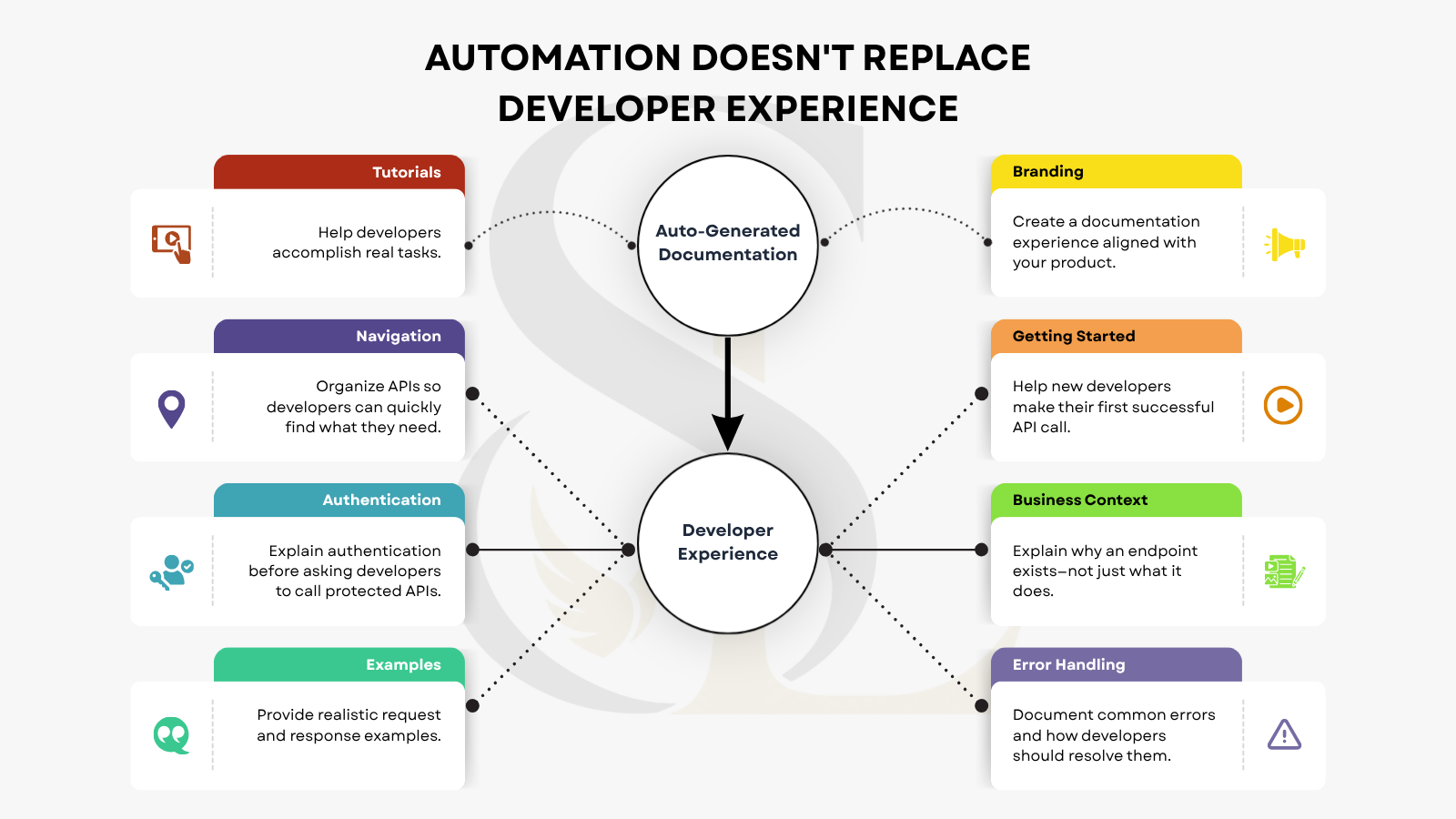
What Auto-Generated Documentation Doesn't Solve
Generating documentation is only the beginning.
A documentation engine can render an API beautifully.
It cannot decide how developers should experience your platform.
Those decisions still require thoughtful design.
Information Architecture
How should APIs be grouped?
Should developers browse by resource, business capability, or service?
Which APIs deserve their own category?
These decisions shape how easily developers discover functionality.
Developer On-boarding
Where should someone begin?
Should the documentation include:
A Quick Start guide?
Authentication walkthrough-s?
First API examples?
Sample projects?
Documentation engines cannot answer these questions.
Teams must design the on-boarding experience intentionally.
Navigation
A technically accurate portal can still be frustrating to use.
Can developers quickly find the endpoint they're looking for?
Or are they forced to browse dozens of unrelated operations?
Good navigation is a UX decision—not an automated feature.
Business Context
Endpoint descriptions explain what an endpoint does.
Developers also need to understand why it exists.
For example:
Instead of:
POST /students
Explain:
Creates a new student record during the admissions workflow after the application has been approved.
That small amount of context dramatically improves understanding.
Examples
Developers learn by seeing realistic examples.
Good documentation includes:
Sample requests
Sample responses
Common workflows
Realistic payloads
Automation can display examples.
Humans still need to write meaningful ones.
Error Handling
Developers eventually encounter errors.
Great documentation prepares them.
Instead of simply listing status codes, explain:
Why the error occurred
What it means
How developers should resolve it
Good error documentation reduces support requests and speeds up integration.
Branding and Trust
For many developers, documentation is the first experience they have with your product.
A well-designed portal communicates professionalism.
Consistent branding, thoughtful typography, intuitive navigation, and polished layouts build confidence before a single API call is made.
That's something automation cannot generate.
Auto-Generated Documentation vs Developer Documentation
These two terms are often used interchangeably.
They're not the same.
| Auto-Generated Documentation | Developer Documentation |
|---|---|
| Endpoint reference | Getting Started guides |
| Parameters | Integration tutorials |
| Request & response schemas | Authentication walkthrough-s |
| Authentication definitions | SDK examples |
| Response models | Best practices |
| Examples | Error handling guidance |
| Status codes | Business context |
| API reference | Real-world implementation guidance |
Auto-generated documentation explains the API.
Developer documentation helps developers build successful integrations.
The best developer portals combine both.
Choosing the Right Documentation Tool
Today, several mature documentation engines are available, each with its own strengths.
Swagger UI
One of the most widely adopted tools in the industry, Swagger UI is trusted for its familiarity, broad ecosystem support, and straightforward setup.
It is an excellent choice for teams looking for a proven and reliable solution.
Scalar
Scalar builds upon the OpenAPI Specification with a modern, developer-focused interface.
Its clean layout, intuitive navigation, dark mode support, and customization capabilities make it particularly appealing for organizations that value developer experience and branding.
Redoc
Redoc focuses on structured navigation and readability, making it especially suitable for large APIs with extensive endpoint collections.
Its three-panel layout allows developers to navigate documentation efficiently while keeping request details visible.
Ultimately, no documentation engine is universally "better."
The right choice depends on:
Your team's workflow
Branding requirements
Customization needs
Documentation complexity
The experience you want developers to have
Regardless of which tool you choose, remember one important principle:
A documentation engine only presents the information it receives.
The quality of your documentation ultimately depends on the quality of your OpenAPI Specification and the thoughtfulness of your documentation design.
Questions Every Team Should Ask Before Publishing API Documentation
Before making documentation available to developers, pause and ask:
Can a new developer make their first successful API call without external help?
Is authentication explained before introducing protected endpoints?
Are realistic request and response examples provided?
Are common error responses documented?
Is the documentation organized around how developers think?
Does the documentation explain the business purpose behind important APIs?
Does the documentation reflect the quality and professionalism of the product itself?
If the answer to several of these questions is "No," then generating documentation was only the first step.
Key Takeaways
Remember these five principles whenever you're working with API documentation.
Auto-generated documentation does not create documentation. It presents an existing OpenAPI Specification in an interactive format.
The OpenAPI Specification is the true source of documentation. Documentation engines simply render it.
Keeping documentation synchronized is only one part of the problem. Helping developers succeed requires much more.
Developer experience is designed—not generated. Navigation, on-boarding, examples, business context, and branding all require human decisions.
Great API documentation is a product. Treat it with the same care you give the software it represents.
Final Thoughts
Auto-generated API documentation has fundamentally changed how modern software teams document and maintain APIs.
By adopting standards such as the OpenAPI Specification alongside documentation engines like Scalar, Swagger UI, or Redoc, organizations can keep API references accurate, consistent, and significantly easier to maintain.
But automation has a clear boundary.
It can keep documentation synchronized.
It cannot decide what developers need to learn first.
It cannot explain the business context behind an endpoint.
It cannot design intuitive navigation.
It cannot create meaningful on-boarding experiences.
And it cannot replace thoughtful developer experience.
That's still the responsibility of the people building the product.
As APIs become increasingly central to modern software, documentation should no longer be viewed as something created after development.
It should be treated as part of the product itself.
Because the quality of an API is measured not only by how well it works—
but also by how easily developers can understand and use it.
References
The following resources are excellent starting points for learning more about modern API documentation:
If this article helped clarify how auto-generated API documentation works, I'd love to hear your thoughts or experiences. Connect with me on LinkedIn, or follow this publication for more articles on software engineering, developer experience, SaaS architecture, APIs, and modern product development.